Building a Bare-Metal Kubernetes Cluster on Raspberry Pis, Part 2
In Part 1, I set up a single Raspberry Pi 5 as a one-node kubeadm cluster: Flannel first, then Cilium in place of kube-proxy, with Argo CD to measure its memory cost and a look at how an SD card holds up under etcd. This part turns that test into the real thing: two more Pis, Ethernet, and a three-node HA control plane behind a virtual IP.
Adding two Lite nodes
With node-1 running as a single-node test, I flashed two more Pis, node-2 and node-3, with Raspberry Pi OS Lite (64-bit) on 16GB SD cards. They stay on Wi-Fi with temporary DHCP addresses until the Ethernet cables arrive.
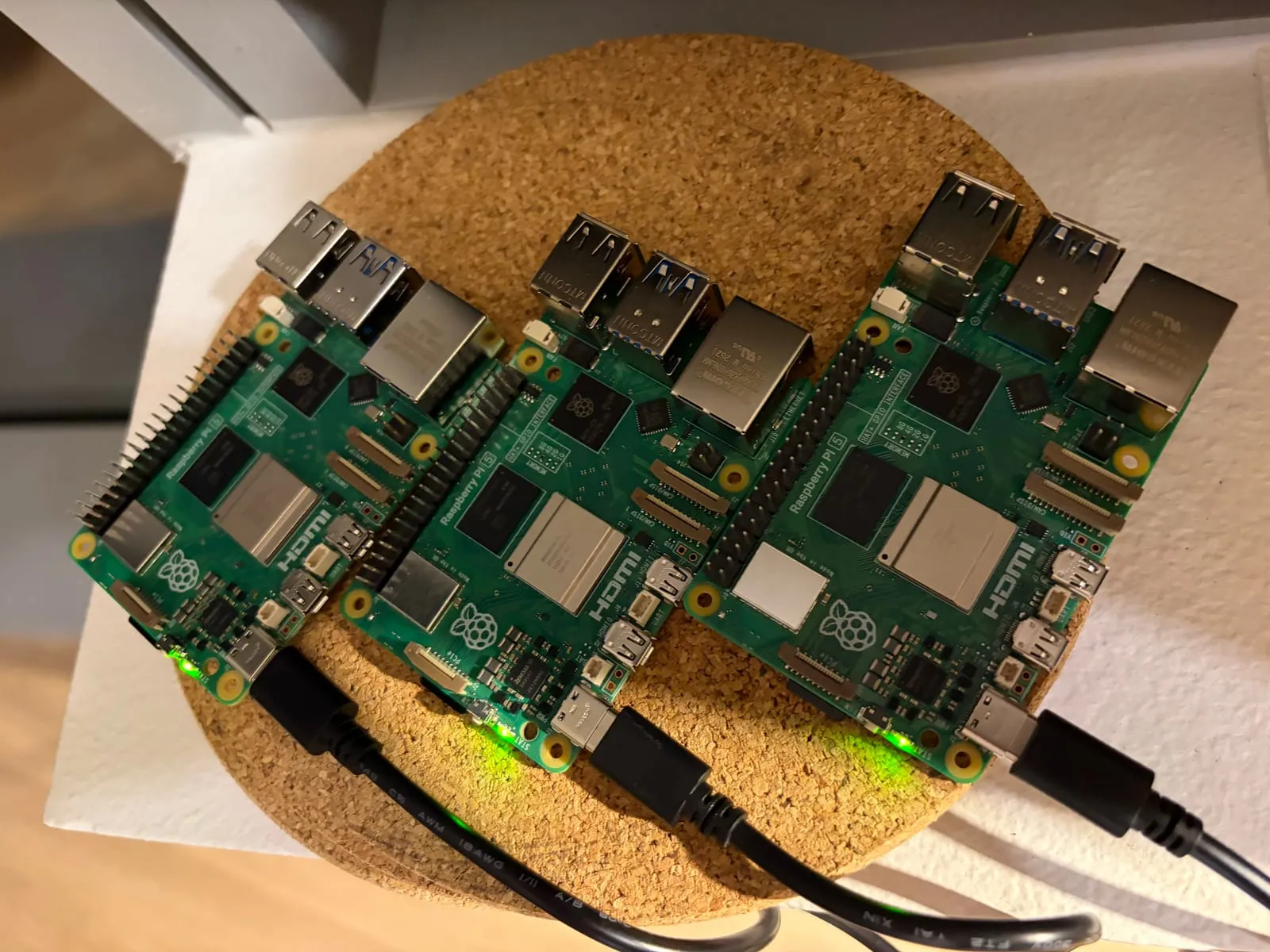
What a fresh Lite install looks like
# On node-2: OS and kernel
$ hostname; uname -r; grep PRETTY_NAME /etc/os-release
node-2
6.18.50+rpt-rpi-2712
PRETTY_NAME="Debian GNU/Linux 13 (trixie)"

# Memory, swap and the leftover swap file
$ free -h; swapon --show; ls -lh /var/swap
               total        used        free      shared  buff/cache   available
Mem:           4.0Gi       213Mi       3.3Gi        12Mi       530Mi       3.7Gi
Swap:          2.0Gi          0B       2.0Gi
NAME       TYPE      SIZE USED PRIO
/dev/zram0 partition   2G   0B  100
-rw------- 1 root root 157M Oct  5 17:27 /var/swap

# The kernel's cgroup flags
$ grep -o 'cgroup[a-z_]*=[a-z0-9]*' /proc/cmdline
cgroup_disable=memory

# Disk use
$ df -h /
Filesystem      Size  Used Avail Use% Mounted on
/dev/mmcblk0p2   15G  2.0G   12G  15% /
The difference from the desktop image is large. The node idles at 213Mi of memory, against 429Mi on node-1 before Kubernetes, and a fresh install uses 2.0G of disk instead of 12G. It has the same kernel as node-1. It also starts from the same defaults: the firmware disables the memory cgroup, and zram swap is on, along with a small swap file.
Prep and verification
The prep block is the same work I did by hand on node-1 in Part 1, written so it can be rerun safely. It adds the cgroup flags only if they’re missing, turns swap off and masks the units that bring it back, removes the swap file, and sets the kernel modules and sysctls:
# On node-2: enable the memory cgroup, but only if the flags aren't already there
$ grep -q cgroup_enable=memory /boot/firmware/cmdline.txt || sudo sed -i '1 s/$/ cgroup_memory=1 cgroup_enable=memory/' /boot/firmware/cmdline.txt

# Turn swap off now, and mask the units that would turn it back on at boot
$ sudo swapoff -a
$ sudo systemctl mask dev-zram0.swap systemd-zram-setup@zram0.service rpi-zram-writeback.timer
$ sudo rm -f /var/swap

# Load the kernel modules Kubernetes networking needs, now and at every boot
$ printf 'overlay\nbr_netfilter\n' | sudo tee /etc/modules-load.d/k8s.conf

# Set the networking sysctls
$ printf 'net.bridge.bridge-nf-call-iptables  = 1\nnet.bridge.bridge-nf-call-ip6tables = 1\nnet.ipv4.ip_forward                 = 1\n' | sudo tee /etc/sysctl.d/k8s.conf

# Reboot so everything takes effect
$ sudo reboot

# (reconnected over SSH after the reboot)

# Swap should be off, with no swap file left behind
$ swapon --show
$ ls -lh /var/swap
ls: cannot access '/var/swap': No such file or directory

# The memory controller should now be listed
$ cat /sys/fs/cgroup/cgroup.controllers
cpuset cpu io memory pids

# No desktop, and memory use at idle
$ systemctl get-default
multi-user.target
$ free -h
               total        used        free      shared  buff/cache   available
Mem:           4.0Gi       217Mi       3.6Gi        12Mi       169Mi       3.7Gi
Swap:             0B          0B          0B
Swap stayed off and the swap file didn’t come back after the reboot. On the Lite image, masking the units was enough.
containerd 2.x and the Kubernetes packages
On node-1, Debian’s containerd 1.7 caused two problems: a CNI path that didn’t match where Kubernetes installs its plugins, and a runtime warning that kubeadm says will stop working in 1.37. For the new nodes I used containerd.io from Docker’s apt repository, which supports Debian 13 and ships the upstream build. Both nodes came out on containerd v2.4.1. Its generated config is version 4, and the settings that had bitten node-1 are right from the start:
# On node-2: the version installed from Docker's repository
$ containerd --version
containerd containerd v2.4.1 f2551031d7276a770f65f98c9b52e57e7dad07e8

# Generate a fresh config and switch to the systemd cgroup driver
$ containerd config default | sudo tee /etc/containerd/config.toml >/dev/null
$ sudo sed -i 's/SystemdCgroup = false/SystemdCgroup = true/' /etc/containerd/config.toml

# Check the settings that matter
$ grep -n -E '^version|disabled_plugins|SystemdCgroup|bin_dir|sandbox' /etc/containerd/config.toml
1:version = 4
5:disabled_plugins = []
28:      sandbox = 'registry.k8s.io/pause:3.10.2'
76:          sandboxer = 'podsandbox'
89:            SystemdCgroup = true
92:      bin_dirs = ['/opt/cni/bin']
124:    bin_dir = '/opt/containerd/image-verifier/bin'
The CNI plugin path is /opt/cni/bin, where Debian’s package had /usr/lib/cni, and the pause image is the 3.10.2 that kubeadm recommends, where Debian’s had 3.8. The bin_dir on line 124 is a different setting, for image signature verifiers, and has nothing to do with CNI.
Then the same Kubernetes v1.36 packages as node-1, held so a routine upgrade can’t bump them:
# On node-2
$ sudo apt-mark hold kubelet kubeadm kubectl
kubelet set on hold.
kubeadm set on hold.
kubectl set on hold.
$ kubeadm version -o short
v1.36.5
Node-3 got the same treatment and matched node-2: same kernel, swap off with no swap file, the memory controller enabled, no desktop, containerd v2.4.1 and kubeadm v1.36.5. On both nodes, kubelet shows activating because it restarts in a loop until kubeadm init or join gives it a configuration, which is expected before a node joins. I also pre-pulled the seven control plane images on both, so the real bootstrap wouldn’t have to download them while the cluster was starting up. That matters because pulling images was when the SD card struggled on node-1.
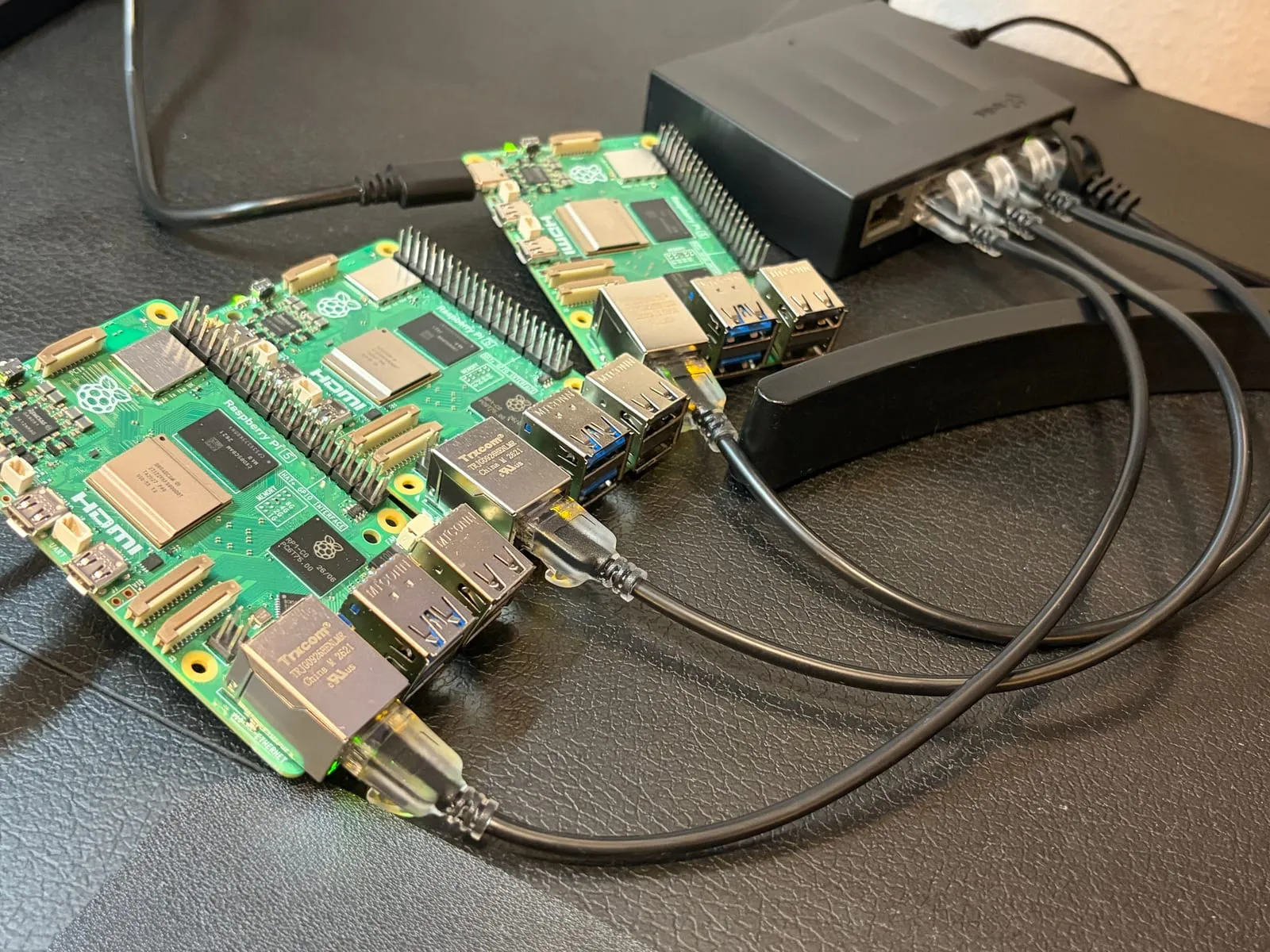
Moving the nodes onto Ethernet
With the cables connected, I checked each Pi’s link. Node-1 negotiated gigabit and picked up a temporary address over Ethernet while Wi-Fi was still configured. Its routing table shows why traffic prefers the cable: the default route over eth0 has a lower metric than the one over wlan0.
# On node-1
$ cat /sys/class/net/eth0/speed
1000
$ ip -br addr show eth0
eth0             UP             10.0.0.149/24 <IPv6 addresses omitted>
$ ip route
default via 10.0.0.1 dev eth0 proto dhcp src 10.0.0.149 metric 100
default via 10.0.0.1 dev wlan0 proto dhcp src 10.0.0.150 metric 600
10.0.0.0/24 dev eth0 proto kernel scope link src 10.0.0.149 metric 100
10.0.0.0/24 dev wlan0 proto kernel scope link src 10.0.0.150 metric 600
...
Each interface has its own MAC address, so a router reservation tied to a Pi’s Wi-Fi MAC doesn’t carry over to its Ethernet MAC. I turned Wi-Fi off on each node and reserved the Ethernet MACs at 10.0.0.150, .151 and .152.
The gateway’s admin page was a poor guide to whether that worked. Node-1’s old Wi-Fi reservation still held .150, and I couldn’t delete a reservation for an offline device, so the gateway refused the new one with an “IP has already been reserved for another device” message. It showed the same message for nodes 2 and 3, even though their reservations had already gone through. Node-1 also kept its temporary .149 address for a while, because a reservation only takes effect when the Pi next asks for an address. Once it was on .150, ip route showed proto static: the address is set on the Pi itself, and the reservation just keeps the gateway from handing it to anything else.
The lesson is that the router’s device list shows what the gateway has recorded, not what the Pi is actually using. A ping sweep of the addresses, ssh <user>@10.0.0.151 hostname, and ip route on each Pi tell you the truth.
Resetting node-1 and installing containerd 2.x
Node-1 still had Debian’s containerd 1.7 and the old Cilium test cluster, so it needed a clean start. I reset kubeadm, removed the old runtime and its image store, and rebooted:
# On node-1: tear down the old cluster
$ sudo kubeadm reset -f
$ sudo systemctl stop kubelet containerd
$ sudo rm -rf /etc/cni/net.d $HOME/.kube

# Remove Debian's container runtime and its image store
$ sudo apt-get remove -y containerd runc
$ sudo rm -rf /var/lib/containerd

# Reboot to clear the old network interfaces and rules
$ sudo reboot
Then I installed containerd.io from Docker’s apt repository, exactly as on nodes 2 and 3. dpkg stopped to ask about the config.toml Debian’s package left behind, but either answer works because the next step regenerates it. Node-1 then matched the other two: containerd v2.4.1, kubeadm v1.36.5, seven pre-pulled images, and 4.7G (35%) of disk used, down from 7.8G (58%) before the reset.
kube-vip: one stable address for three API servers
With three control plane nodes, everything that talks to the cluster needs a single address that keeps working when one node dies. If kubectl, kubelet and Cilium all pointed at node-1’s own address, losing node-1 would cut them off from the cluster even though nodes 2 and 3 were fine. kubeadm lets you name that address with --control-plane-endpoint, and kube-vip is what makes it real.
kube-vip runs as a pod on each control plane node and holds a leader election through a lease object in the cluster. The leader adds the virtual IP to its network interface and announces it on the local network with ARP, so traffic for that address goes to it. If the leader dies, its lease expires, another node wins the election, takes the address and announces it. The virtual IP isn’t a machine. It’s an extra address that one node at a time claims.
It runs as a static pod because it has to start before the cluster exists: kubeadm init needs the address to be reachable, so kubelet starts kube-vip straight from the manifests directory, the same way it starts etcd and the API server. Two limits are worth knowing. In ARP mode only the leader holds the address, so API traffic isn’t spread across the three servers. And ARP only works on one shared network segment, which is one more reason the Pis are on Ethernet.
Reserving the address
The gateway’s DHCP pool turned out to be the whole subnet:
DHCP Beginning Address: 10.0.0.2
DHCP Ending Address:    10.0.0.253
DHCPv4 Lease Time:      2 Days
So my planned virtual IP, 10.0.0.160, sat inside the pool. kube-vip claims its address over ARP and never asks DHCP, so the gateway has no idea it’s in use and could lease it to a phone or a TV, and then two devices would fight over the API endpoint. To prevent that, I reserved 10.0.0.160 in the gateway against a made-up MAC address, 02:00:00:00:01:60, with the name k8s-vip. A leading 02 marks a MAC as locally administered, so it can’t collide with a real card’s factory address, and the gateway accepted it. The fake MAC never appears on the network, because kube-vip announces the address with the leader’s real MAC. It exists only in the gateway’s bookkeeping.
Bootstrapping the first control plane
kube-vip’s image can generate its own static pod manifest. I ran it with ctr in the same namespace kubelet uses, pointed it at eth0 and the virtual IP, and put the result in the static pod directory before running kubeadm init:
# On node-1: install jq, which the version lookup below uses
$ sudo apt-get install -y jq
$ sudo mkdir -p /etc/kubernetes/manifests

# The virtual IP, and the network interface it will live on
$ export VIP=10.0.0.160 INTERFACE=eth0

# Look up the newest kube-vip release
$ export KVVERSION=$(curl -sL https://api.github.com/repos/kube-vip/kube-vip/releases | jq -r ".[0].name")

# Pull the image into the namespace kubelet uses
$ sudo ctr -n k8s.io image pull ghcr.io/kube-vip/kube-vip:$KVVERSION

# Have the image generate its own static pod manifest, in ARP mode with leader election
$ sudo ctr -n k8s.io run --rm --net-host ghcr.io/kube-vip/kube-vip:$KVVERSION vip /kube-vip manifest pod \
    --interface $INTERFACE --address $VIP --controlplane --arp --leaderElection \
    | sudo tee /etc/kubernetes/manifests/kube-vip.yaml >/dev/null

# Point kube-vip at super-admin.conf for the moment of bootstrap
$ sudo sed -i 's#path: /etc/kubernetes/admin.conf#path: /etc/kubernetes/super-admin.conf#' /etc/kubernetes/manifests/kube-vip.yaml

# Initialize the cluster, with the virtual IP as the control plane endpoint
$ sudo kubeadm init \
    --control-plane-endpoint 10.0.0.160:6443 \
    --apiserver-advertise-address 10.0.0.150 \
    --pod-network-cidr 10.244.0.0/16 \
    --upload-certs \
    --skip-phases addon/kube-proxy
A few of those flags are worth explaining. --controlplane --arp --leaderElection makes kube-vip provide the control plane address in ARP mode with a leader election. I left out --services, which would also have it load-balance Services, because I haven’t picked a tool for that yet. The sed switches kube-vip to super-admin.conf for the moment of bootstrap: since Kubernetes 1.29, kubeadm doesn’t make admin.conf usable until init finishes, so kube-vip needs the other credential to take the leader lease. On the kubeadm init side, --control-plane-endpoint makes the virtual IP the cluster’s address, --upload-certs stores the control plane certificates, encrypted, so nodes 2 and 3 can fetch them when they join, and --skip-phases addon/kube-proxy leaves room for Cilium to replace it. The two kubeadm join commands printed at the end of init contain a token and a certificate key, so I’m keeping them out of this post.
After init, I set up kubectl, switched kube-vip back to the normal admin.conf (which makes kubelet restart its pod), and looked at the result:
# On node-1: set up kubectl for my user
$ mkdir -p $HOME/.kube
$ sudo cp /etc/kubernetes/admin.conf $HOME/.kube/config
$ sudo chown $(id -u):$(id -g) $HOME/.kube/config

# Switch kube-vip back to the normal admin.conf (kubelet restarts its pod)
$ sudo sed -i 's#path: /etc/kubernetes/super-admin.conf#path: /etc/kubernetes/admin.conf#' /etc/kubernetes/manifests/kube-vip.yaml

# The virtual IP should now be a second address on eth0
$ ip -br addr show eth0
eth0             UP             10.0.0.150/24 10.0.0.160/32 <IPv6 addresses omitted>

# While kube-vip's pod was restarting, kubectl couldn't reach the address
$ kubectl get nodes
E1012 23:59:35.109104    3406 memcache.go:265] "Unhandled Error" err="couldn't get current server API group list: Get \"https://10.0.0.160:6443/api?timeout=32s\": dial tcp 10.0.0.160:6443: connect: no route to host"
...
Unable to connect to the server: dial tcp 10.0.0.160:6443: connect: no route to host

# A few seconds later, the control plane pods were visible
$ kubectl get pods -A
NAMESPACE     NAME                             READY   STATUS    RESTARTS   AGE
kube-system   coredns-589f44dc88-2thfs         0/1     Pending   0          17s
kube-system   coredns-589f44dc88-sklk9         0/1     Pending   0          17s
kube-system   etcd-node-1                      1/1     Running   26         22s
kube-system   kube-apiserver-node-1            1/1     Running   24         23s
kube-system   kube-controller-manager-node-1   1/1     Running   13         22s
kube-system   kube-scheduler-node-1            1/1     Running   14         22s
kube-system   kube-vip-node-1                  1/1     Running   0          2s
The virtual IP shows up as a second address on eth0, 10.0.0.160/32, and the kube-vip-node-1 pod is running. The no route to host errors are from the few seconds while kube-vip’s pod was restarting after the sed edit, which briefly removed the address. About a minute later, the API answered through the virtual IP, and the node was NotReady only because there’s no network plugin yet:
# On node-1
$ kubectl get nodes
NAME     STATUS     ROLES           AGE   VERSION
node-1   NotReady   control-plane   94s   v1.36.5
$ curl -k https://10.0.0.160:6443/livez; echo
ok
The restart counts in that pod list looked alarming: 26 for etcd, 24 for the API server, 14 for the scheduler and 13 for the controller manager. But all four control plane containers shared one start time, and the counts didn’t move over the next few minutes, so they had been restarted together once during init rather than crash-looping. I never worked out how the counts got that high, but the cluster was stable, and that was the thing I needed to know before adding more to it.
Installing Cilium on the HA control plane
This is the same install as on the single node, with one change: Cilium is pointed at the virtual IP instead of node-1’s own address, so its agents keep working when the address moves between nodes.
# On node-1
$ kubectl taint nodes --all node-role.kubernetes.io/control-plane-
$ cilium install --version 1.19.5 \
  --set kubeProxyReplacement=true \
  --set k8sServiceHost=10.0.0.160 \
  --set k8sServicePort=6443 \
  --set ipam.mode=kubernetes
A few minutes later, Cilium’s three pods were running and CoreDNS had finally gone 1/1, after waiting 12 minutes for a network plugin:
# On node-1
$ kubectl get pods -A
NAMESPACE     NAME                               READY   STATUS    RESTARTS         AGE
kube-system   cilium-envoy-dmc26                 1/1     Running   0                5m23s
kube-system   cilium-operator-59594c9bf8-vqnpq   1/1     Running   0                5m23s
kube-system   cilium-pvs2d                       1/1     Running   0                5m23s
kube-system   coredns-589f44dc88-2thfs           1/1     Running   0                12m
kube-system   coredns-589f44dc88-sklk9           1/1     Running   0                12m
kube-system   etcd-node-1                        1/1     Running   26               12m
kube-system   kube-apiserver-node-1              1/1     Running   24               12m
kube-system   kube-controller-manager-node-1     1/1     Running   14 (4m34s ago)   12m
kube-system   kube-scheduler-node-1              1/1     Running   15 (4m29s ago)   12m
kube-system   kube-vip-node-1                    1/1     Running   1 (4m28s ago)    12m
The virtual IP that dropped
The scheduler, the controller manager and kube-vip had each restarted once, within seconds of each other, shortly after the Cilium install began. The logs of their previous containers explain why:
# On node-1
$ kubectl -n kube-system logs kube-scheduler-node-1 --previous | tail -15
...
I1013 07:07:19.541534       1 leaderelection.go:304] "Failed to renew lease" lock="kube-system/kube-scheduler" err="context deadline exceeded"
E1013 07:07:28.923806       1 server.go:328] "Leaderelection lost"
$ kubectl -n kube-system logs kube-vip-node-1 --previous | tail -15
...
2026/10/13 07:07:29 INFO [VIP] Deleting VIP ip=10.0.0.160
2026/10/13 07:07:29 ERROR lost leadership, restarting kube-vip
The controller manager’s log showed the same lease failure at 07:07:23. All three tell the same story at almost the same moment: requests to the API server timed out, so none of them could renew its leader-election lease in time. The timeout was 5 seconds for the scheduler and the controller manager, and 10 seconds for kube-vip. Those components are built to exit when they lose their lease, and kubelet restarts them. kube-vip did the same: it gave up leadership, removed 10.0.0.160 from eth0 and restarted. For a few seconds, the virtual IP didn’t exist anywhere.
kube-vip’s log shows it was talking to https://kubernetes:6443, which its manifest maps to the local API server. So the API server on node-1 itself was unresponsive for roughly ten seconds around 07:07:19 UTC (00:07 local time), right as Cilium was installing and pulling images. That matches what I measured in Part 1 on this SD card: etcd’s disk syncs stall when image pulls and heavy writes happen, and an API server that can’t write to etcd stops answering. I haven’t confirmed that the stall came from etcd’s disk, though. etcd’s own log from that window should show it.
The bigger lesson is about how the pieces depend on each other. kube-vip’s leader election runs through the API server, so a slow API server can make the virtual IP move for no good reason. This time it was a false alarm: nothing was wrong with the node except a busy disk. With three nodes, the address would have jumped to another one. Either way, slow control plane storage turns into a flapping API address, which is a concrete argument for SSDs.
What etcd’s own log showed
I went back to etcd’s log to see whether it agreed. Part of the picture was there. A few minutes after the stall, etcd was still reporting requests that took far longer than its 100ms expectation, including trivial one-key reads. This is summarized from etcd’s JSON log lines, with times in UTC:
07:09:01  apply request took too long  took=1.523s  (read of /registry/health, expected 100ms)
07:13:22  apply request took too long  took=284ms   (write of lease kube-system/kube-scheduler)
07:13:23  apply request took too long  took=209ms   (write of lease kube-system/plndr-cp-lock)
The last two are writes to the very leases the scheduler and kube-vip had failed to renew earlier, so etcd was slow at exactly the thing those components depend on. This isn’t proof, though. My tail started after the 07:07 stall, so it doesn’t show that window itself, and etcd also slows down when the CPU is busy, which it was while unpacking images. I can’t blame the disk alone, but the pattern fits.
Joining node-2 and node-3
The stall during the Cilium install came from pulling and unpacking images on an SD card, and joining a node adds load to the first one. So before joining anything, I pulled the Cilium, Envoy and kube-vip images onto node-2 and node-3 ahead of time, and took an etcd snapshot of node-1 as a restore point:
# On node-1
$ kubectl -n kube-system exec etcd-node-1 -- etcdctl --endpoints=https://127.0.0.1:2379 \
  --cacert=/etc/kubernetes/pki/etcd/ca.crt --cert=/etc/kubernetes/pki/etcd/server.crt \
  --key=/etc/kubernetes/pki/etcd/server.key snapshot save /var/lib/etcd/pre-join.db
...
{"level":"info","ts":"2026-10-13T07:23:47.967438Z","caller":"snapshot/v3_snapshot.go:111","msg":"fetched snapshot","endpoint":"https://127.0.0.1:2379","size":"6.8 MB","took":"222.014449ms","etcd-version":"3.6.0"}
Snapshot saved at /var/lib/etcd/pre-join.db
I no longer had the join command from kubeadm init, but it isn’t needed. A fresh one can be generated on node-1 at any time. It needs a new bootstrap token and a new certificate key, because the control plane certificates that --upload-certs stores in the cluster are encrypted with a key that is only valid for about two hours:
# On node-1
$ JOIN=$(sudo kubeadm token create --print-join-command)
$ KEY=$(sudo kubeadm init phase upload-certs --upload-certs | tail -1)
$ echo "sudo $JOIN --control-plane --certificate-key $KEY --apiserver-advertise-address 10.0.0.151"
sudo kubeadm join 10.0.0.160:6443 --token <token> --discovery-token-ca-cert-hash sha256:<hash> --control-plane --certificate-key <key> --apiserver-advertise-address 10.0.0.151
The real output has the token, hash and key filled in. Treat that line like a password, because anyone holding the token and key could join a node to the cluster. It contacts the cluster through the virtual IP (10.0.0.160:6443), not node-1’s own address. --control-plane makes the new node a control plane member with its own etcd and API server, and --certificate-key decrypts the uploaded certificates. I ran it on node-2, and it was Ready after 24 seconds, which I credit to the pre-pulled images:
# On node-1
$ kubectl get nodes
NAME     STATUS   ROLES           AGE   VERSION
node-1   Ready    control-plane   29m   v1.36.5
node-2   Ready    control-plane   24s   v1.36.5
With two etcd members, a majority is both of them, so I didn’t touch either node until the third joined. Then I ran the same command on node-3, with the last value changed to its own address, 10.0.0.152.
One small stumble along the way. When I tried to run kubectl on node-2 right after joining, it refused to connect to localhost:8080. That’s what kubectl does when it finds no kubeconfig, and a joined node has the admin credentials at /etc/kubernetes/admin.conf but no copy for my user, so I made one the same way as on node-1:
# On node-2
$ mkdir -p $HOME/.kube
$ sudo cp /etc/kubernetes/admin.conf $HOME/.kube/config
$ sudo chown $(id -u):$(id -g) $HOME/.kube/config
Giving each new node its own kube-vip
At this point only node-1 ran kube-vip, so if node-1 died, nothing would claim the virtual IP. Each control plane node needs the same manifest. It mounts admin.conf, which only exists on a node after it has joined, so the copy has to wait until then. I copied it from node-1 through my Mac, put it in the static pod directory on each node, and kubelet started the pod:
# On node-1
$ grep 'path: /etc/kubernetes' /etc/kubernetes/manifests/kube-vip.yaml
      path: /etc/kubernetes/admin.conf
$ kubectl -n kube-system get pods | grep kube-vip
kube-vip-node-1                    1/1     Running   1 (24m ago)    32m
kube-vip-node-2                    1/1     Running   0              10s
$ kubectl -n kube-system get lease plndr-cp-lock -o jsonpath='{.spec.holderIdentity}{"\n"}'
node-1
The lease holder is the node that currently owns the virtual IP. The other kube-vip pods wait on standby. Since the manifest is a static pod, the file on each node is the pod. Deleting the pod with kubectl does nothing, because kubelet recreates it, and editing or moving the file is how to change or stop it.
The result
After node-3 joined, I checked everything at once:
# On node-1: the nodes, all Ready
$ kubectl get nodes -o wide
NAME     STATUS   ROLES           AGE     VERSION   INTERNAL-IP   EXTERNAL-IP   OS-IMAGE                       KERNEL-VERSION                 CONTAINER-RUNTIME
node-1   Ready    control-plane   37m     v1.36.5   10.0.0.150    <none>        Debian GNU/Linux 13 (trixie)   6.18.50+rpt-rpi-2712 (arm64)   containerd://2.4.1
node-2   Ready    control-plane   8m50s   v1.36.5   10.0.0.151    <none>        Debian GNU/Linux 13 (trixie)   6.18.50+rpt-rpi-2712 (arm64)   containerd://2.4.1
node-3   Ready    control-plane   3m37s   v1.36.5   10.0.0.152    <none>        Debian GNU/Linux 13 (trixie)   6.18.50+rpt-rpi-2712 (arm64)   containerd://2.4.1

# One etcd pod and one kube-vip pod per node
$ kubectl -n kube-system get pods | grep -E 'kube-vip|etcd'
etcd-node-1                        1/1     Running   26             37m
etcd-node-2                        1/1     Running   0              8m50s
etcd-node-3                        1/1     Running   0              3m24s
kube-vip-node-1                    1/1     Running   1 (29m ago)    37m
kube-vip-node-2                    1/1     Running   0              5m12s
kube-vip-node-3                    1/1     Running   0              96s

# The kubernetes Service now has one backend per API server
$ kubectl get endpoints kubernetes
NAME         ENDPOINTS                                         AGE
kubernetes   10.0.0.150:6443,10.0.0.151:6443,10.0.0.152:6443   37m

# The kube-vip lease holder is the node that owns the virtual IP
$ kubectl -n kube-system get lease plndr-cp-lock -o jsonpath='{.spec.holderIdentity}{"\n"}'
node-1

# etcd's members: all three started, none a learner
$ kubectl -n kube-system exec etcd-node-1 -- etcdctl --endpoints=https://127.0.0.1:2379 \
  --cacert=/etc/kubernetes/pki/etcd/ca.crt --cert=/etc/kubernetes/pki/etcd/server.crt \
  --key=/etc/kubernetes/pki/etcd/server.key member list -w table
+------------------+---------+--------+-------------------------+-------------------------+------------+
|        ID        | STATUS  |  NAME  |       PEER ADDRS        |      CLIENT ADDRS       | IS LEARNER |
+------------------+---------+--------+-------------------------+-------------------------+------------+
|  ce094247d67c828 | started | node-2 | https://10.0.0.151:2380 | https://10.0.0.151:2379 |      false |
| 441669a7407146ce | started | node-3 | https://10.0.0.152:2380 | https://10.0.0.152:2379 |      false |
| aec334b6bd14f255 | started | node-1 | https://10.0.0.150:2380 | https://10.0.0.150:2379 |      false |
+------------------+---------+--------+-------------------------+-------------------------+------------+
Three control plane nodes, all Ready. Three etcd members, all started and none a learner, so a majority is any two of them and the cluster can lose one. The kubernetes Service now has three backends, one per API server. Three kube-vip pods, with node-1 holding the lease and so the virtual IP. This is the HA control plane I set out to build.
Cleaning up the join secrets
The join command holds a bootstrap token and the key to the uploaded control plane certificates, so once the nodes had joined, I removed both, along with the other tokens left over from kubeadm init and the certificate uploads:
# On node-1
$ sudo kubeadm token delete <token ID>
bootstrap token "<token ID>" deleted
$ kubectl -n kube-system delete secret kubeadm-certs
$ kubeadm token list
...
$ sudo kubeadm token delete <token ID> <token ID> <token ID>
The uploaded certificates would have been deleted on their own after about two hours, and the token expires after 24 hours. This just closes the window early.
One thing worth knowing: kubeadm token list prints the full token values, not just their IDs, so its output is as sensitive as the join command itself and shouldn’t be pasted anywhere. Nothing running on the cluster needs these tokens once the nodes have joined, because each kubelet authenticates with its own certificate, and a new token takes one command to create when I need to add a node.
Reaching the cluster from my Mac
kubectl is an ordinary API client, so any machine on my home network with a kubeconfig pointing at the virtual IP can manage the cluster. The cluster’s admin credentials live in /etc/kubernetes/admin.conf on the control plane nodes, readable only by root, so I staged a copy in my home directory on node-1, copied it to my Mac, and deleted the staged copy:
# On node-1: stage a copy of the admin credentials that my user can read
$ sudo cp /etc/kubernetes/admin.conf ~/homelab.conf && sudo chown <user> ~/homelab.conf

# On my Mac: install kubectl and copy the file over
$ brew install kubectl
$ scp <user>@10.0.0.150:~/homelab.conf ~/.kube/homelab.conf
$ chmod 600 ~/.kube/homelab.conf

# On node-1: delete the staged copy
$ rm ~/homelab.conf

# On my Mac: point kubectl at the file, and give the context a clearer name
$ export KUBECONFIG=~/.kube/homelab.conf
$ kubectl config rename-context kubernetes-admin@kubernetes homelab
The file’s server: line should point at the virtual IP, https://10.0.0.160:6443, which is what makes kubectl keep working if any one node goes away. kubeadm names every cluster’s context kubernetes-admin@kubernetes, so renaming it avoids a clash if I ever add a second kubeadm cluster. From the Mac:
# On my Mac: all three nodes are Ready
$ kubectl get nodes
NAME     STATUS   ROLES           AGE   VERSION
node-1   Ready    control-plane   50m   v1.36.5
node-2   Ready    control-plane   21m   v1.36.5
node-3   Ready    control-plane   15m   v1.36.5
The whole cluster is managed from the laptop, through an address that isn’t tied to any one Pi. Two cautions go with this. The file is a cluster-admin credential, so it’s as sensitive as a root password and stays out of this post and out of any synced folder. And it only works on my home network, so for remote access I’d use a VPN and not forward port 6443 on the router.
Spreading CoreDNS across the nodes
The two CoreDNS pods and the Cilium operator had been created while node-1 was the only node, and Kubernetes doesn’t move running pods onto new nodes by itself. They all sat on node-1, so losing node-1 would have taken DNS down with it. Restarting the CoreDNS deployment lets the scheduler place the new pods again:
# On my Mac
$ kubectl -n kube-system rollout restart deployment coredns
The new pods landed on node-2 and node-3. Their addresses also show Cilium’s IPAM at work: each node was handed its own slice of the pod range, 10.244.0.x on node-1, 10.244.1.x on node-2 and 10.244.2.x on node-3. The Cilium operator is still on node-1. It handles cluster-wide housekeeping and not live traffic, so I left it alone.
How the pieces fit together
A few things I wanted to understand, now that all three nodes are up.
etcd isn’t shared. Each node has its own full copy. The three members keep their copies identical using the Raft algorithm. One member is the Raft leader. A write goes to the leader, which syncs it to its own disk and sends it to the followers, and it counts as committed once a majority, two of three, have it on disk. Each API server talks only to the etcd member on its own node. That is why two members would have been fragile, since a majority of two is both of them, and why three can lose one.
The kube-vip lease is just an object in etcd. The key is /registry/leases/kube-system/plndr-cp-lock, which is the name that showed up in etcd’s slow-request warnings. Every renewal goes through the local API server and becomes an etcd write. So the virtual IP’s health depends on the API server and etcd being responsive, which is why a busy SD card made it drop during the Cilium install. The kube-vip leader and etcd’s Raft leader are separate roles, and they can be on different nodes.
The virtual IP is only one of two paths to the API. Outside clients, kubelets and Cilium’s agents use 10.0.0.160. Pods inside the cluster use the built-in kubernetes Service, 10.96.0.1, whose backends are the API servers’ own node addresses. The list grew as the nodes joined:
# On node-1
$ kubectl get endpoints kubernetes
NAME         ENDPOINTS         AGE
kubernetes   10.0.0.150:6443   10m
and later showed all three API servers, as in the result above. An ordinary Service is different: its backends are the ready pods that match a selector, which is why kube-dns lists pod addresses:
# On node-1
$ kubectl -n kube-system get endpoints kube-dns
NAME       ENDPOINTS                                                       AGE
kube-dns   10.244.0.12:9153,10.244.0.148:9153,10.244.0.12:53 + 3 more...   14m
I decided not to run a failover drill, stopping kube-vip on the leader and then powering the node off, for now. The accidental drop during the Cilium install already showed the same sequence: kube-vip lost its lease, removed the address and restarted.
Metrics-server and the kubelet’s certificate
Metrics-server collects CPU and memory numbers from each node’s kubelet and serves them through the API. It’s what makes kubectl top work, and it’s what autoscaling reads. It connects to every kubelet’s port 10250 over HTTPS and has to be sure it’s talking to the real kubelet, so it checks the kubelet’s certificate against the cluster’s certificate authority. kubeadm’s kubelets present a self-signed certificate by default, and that check fails. The quick fix is a flag that makes metrics-server skip verification. I wanted to understand the certificates, so I fixed the kubelets instead.
The cluster’s certificates
A certificate is a public key bundled with an identity and a signature from a certificate authority (CA). Anyone who trusts the CA can check the signature. Kubernetes uses certificates in two directions. Serving certificates prove a server’s identity to whoever connects, and client certificates prove who a client is, with the name inside becoming its username for access control. kubeadm creates separate CAs for the cluster, for etcd and for the front proxy, and a set of certificates under them:
# On node-1
$ sudo kubeadm certs check-expiration
...
CERTIFICATE                EXPIRES                  RESIDUAL TIME   CERTIFICATE AUTHORITY   EXTERNALLY MANAGED
admin.conf                 Oct 13, 2027 06:59 UTC   362d            ca                      no
apiserver                  Oct 13, 2027 06:59 UTC   362d            ca                      no
apiserver-etcd-client      Oct 13, 2027 06:59 UTC   362d            etcd-ca                 no
apiserver-kubelet-client   Oct 13, 2027 06:59 UTC   362d            ca                      no
controller-manager.conf    Oct 13, 2027 06:59 UTC   362d            ca                      no
etcd-healthcheck-client    Oct 13, 2027 06:59 UTC   362d            etcd-ca                 no
etcd-peer                  Oct 13, 2027 06:59 UTC   362d            etcd-ca                 no
etcd-server                Oct 13, 2027 06:59 UTC   362d            etcd-ca                 no
front-proxy-client         Oct 13, 2027 06:59 UTC   362d            front-proxy-ca          no
scheduler.conf             Oct 13, 2027 06:59 UTC   362d            ca                      no
super-admin.conf           Oct 13, 2027 06:59 UTC   362d            ca                      no

CERTIFICATE AUTHORITY   EXPIRES                  RESIDUAL TIME   EXTERNALLY MANAGED
ca                      Oct 10, 2036 06:59 UTC   9y              no
etcd-ca                 Oct 10, 2036 06:59 UTC   9y              no
front-proxy-ca          Oct 10, 2036 06:59 UTC   9y              no
Eleven certificates expire on October 13, 2027, a year after init, and the three CAs in 2036. EXTERNALLY MANAGED: no means kubeadm holds the CA keys and can renew everything itself. The admin.conf I copied to my Mac embeds a client certificate that expires on the same date, so it needs replacing when these are renewed. The kubelets’ own certificates aren’t in this list, because they manage themselves.
The kubelet’s certificate is the odd one out
The kubelet’s serving certificate, the one on port 10250, looks very different from the API server’s:
# On node-1
$ sudo openssl x509 -in /var/lib/kubelet/pki/kubelet.crt -noout -subject -issuer -enddate -ext subjectAltName
subject=CN=node-1@1791874757
issuer=CN=node-1-ca@1791874757
notAfter=Oct 13 05:59:17 2027 GMT
X509v3 Subject Alternative Name:
    DNS:node-1
$ sudo openssl x509 -in /etc/kubernetes/pki/apiserver.crt -noout -subject -issuer -enddate -ext subjectAltName
subject=CN=kube-apiserver
issuer=CN=kubernetes
notAfter=Oct 13 06:59:11 2027 GMT
X509v3 Subject Alternative Name:
    DNS:kubernetes, DNS:kubernetes.default, DNS:kubernetes.default.svc, DNS:kubernetes.default.svc.cluster.local, DNS:node-1, IP Address:10.96.0.1, IP Address:10.0.0.150, IP Address:10.0.0.160
The kubelet’s issuer, node-1-ca@1791874757, is a throwaway authority the kubelet made up for itself, which nothing else in the cluster has heard of. It also lists only DNS:node-1, with no IP address, and metrics-server connects to nodes by IP. So the check fails twice: the issuer isn’t trusted, and the name wouldn’t match anyway. The API server’s certificate is the healthy contrast. It’s signed by the cluster CA, called kubernetes, and every name or address a client might use appears in it, including 10.96.0.1 (the kubernetes Service), the node’s own address, and 10.0.0.160, the virtual IP. That’s why kubectl on my Mac gets a clean TLS connection through the VIP.
Asking the cluster for a signed certificate
The fix is a kubelet setting, serverTLSBootstrap: true. With it, the kubelet creates a certificate signing request (CSR) with the signer name kubernetes.io/kubelet-serving, listing its hostname and IP addresses. kube-controller-manager signs it with the cluster CA, which its command line points at, and the kubelet then serves with the result.
Kubernetes deliberately doesn’t approve these requests automatically. A serving certificate is an identity, and if anything could approve a request for any IP address, a rogue node could get a certificate claiming to be the API server’s address. So I approve each one by hand, after checking that its names are the node’s own hostname and address. Tools like kubelet-csr-approver can automate this with checks.
The setting has to go in two places, because the kubelet’s configuration has two layers:
| What | Where | Shared? |
|---|---|---|
| Cluster-wide defaults | the kubelet-config ConfigMap in kube-system |
Yes, one copy |
| What the kubelet actually reads | /var/lib/kubelet/config.yaml |
No, one per node |
| Its identity to the API server | /etc/kubernetes/kubelet.conf |
No, one per node |
| Its certificates | /var/lib/kubelet/pki/ |
No, one per node |
The ConfigMap is a template. kubeadm copies it into each node’s local file when the node is created, joined or upgraded, and the kubelet only ever reads the local file. So editing the ConfigMap changes nothing on a running node, but it makes the setting survive upgrades and apply to new nodes. A ConfigMap is just an object stored in etcd and read through the API server, so every node sees the same one without any file being shared.
On node-1, I added the line to the local file and restarted the kubelet, which doesn’t restart any pods. A request showed up and I approved it. A few minutes later, node-2’s request was waiting too:
# On node-2
$ kubectl get csr
NAME        AGE     SIGNERNAME                      REQUESTOR            REQUESTEDDURATION   CONDITION
csr-nvsnh   6m29s   kubernetes.io/kubelet-serving   system:node:node-1   <none>              Approved,Issued
csr-p8vb7   3m32s   kubernetes.io/kubelet-serving   system:node:node-2   <none>              Pending
Approved,Issued means the cluster CA signed it and the kubelet received the certificate. With that, metrics-server could verify node-1, and kubectl top nodes started working for it. Nodes 2 and 3 still had the self-signed certificate at that point, so metrics-server couldn’t read them. I repeated the same steps on each, and once all three kubelets had signed certificates, kubectl top nodes covered the whole cluster.
Node-3 had a stumble. Its kubelet had restarted, but grep serverTLSBootstrap /var/lib/kubelet/config.yaml printed nothing, so it had come back without the setting and never asked for a certificate. A kubelet only makes the request when it starts with the setting, so the fix was to append the line and restart it again.
This isn’t a one-time chore. The kubelet rotates its serving certificate before it expires, and each rotation sends a new request that needs approval, so if kubectl top ever breaks for one node, I’ll check for a pending request first.
What’s next
With the control plane in place, here’s what I think this hardware is good for. Each node has about 2.9Gi of memory available before any workloads, and etcd already writes roughly 12GiB a day to each SD card, so heavy writers and anything needing replicated storage are a bad fit. Everything is arm64, and workloads share nodes with the control plane, so resource requests and limits matter. My plan, in order:
- Platform first: etcd backups on a schedule with copies kept off the cluster, the cluster config in Git managed by Argo CD, an address pool for LoadBalancer Services (Cilium’s own or MetalLB), cert-manager, and light monitoring with short retention.
- SSDs for etcd when prices come down and the official drives are back in stock, then a comparison of the fsync, write and lease-renewal behavior.
- Then a light app or two, such as Uptime Kuma or a dashboard. I’d hold off on anything that stores passwords or serves DNS for the house until I trust the cluster.
- Experiments that match the build: a
kubeadm upgradefrom v1.36 to v1.37 one control plane node at a time, a node drain, an etcd restore from the snapshot, Cilium network policies, and Kueue with CPU quotas to play with queueing and preemption. - Not yet: databases with real data, Loki or Elasticsearch, CI runners, media transcoding, and Longhorn or Ceph. They either write heavily to the SD cards or need more memory than a node has.